ClickFix Attacks: The Social Engineering Trick Leading to Credential Theft
ClickFix is a social engineering attack where fake error messages trick users into copying and running malicious PowerShell commands. Instead of downloading suspicious files, victims manually execute malware by following what looks like legitimate troubleshooting steps.
Traditional phishing training teaches employees to avoid clicking suspicious links and downloading unknown attachments. ClickFix bypasses all of that—there’s no link to click, no file to download. Users manually type the commands themselves, making security tools useless. The attack works because copying and pasting commands from Stack Overflow, GitHub, or tech forums is normal troubleshooting behavior. Users often don’t realize text has been copied to their clipboard and that they’re executing a command.
Attackers display fake errors—browser issues, CAPTCHA failures, missing fonts—and provide a “Fix” button that copies malicious code to the clipboard. It feels legitimate because we’ve all fixed problems this way before.
How the Attack Works
Users encounter a fake error on a compromised website or phishing email. A button labeled “Fix It” or “Verify” copies a PowerShell command to the clipboard. Instructions then tell them to press Windows + R, paste with Ctrl + V, and hit Enter.
The pasted command is typically Base64-encoded PowerShell that downloads infostealer malware:
powershell -enc JABzAD0ATgBlAHcALQBPAGIAagBlAGMAdAAgAE4AZQB0AC4AVwBlAGIAQw...When decoded, this fetches and executes Lumma Stealer, Redline, or Raccoon Stealer—all designed to harvest browser passwords, session cookies, cryptocurrency wallets, and saved credentials.
Real Attack Examples
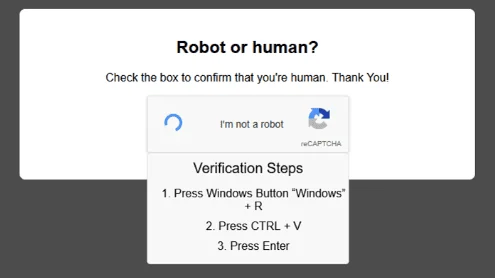
Fake CAPTCHA Verification
Users searching for pirated content or free software hit fake CAPTCHA pages. The page claims verification failed and displays a “Verify You Are Human” button. Clicking it copies a malicious command and instructs users to run it via Windows + R.
Fake Browser Updates
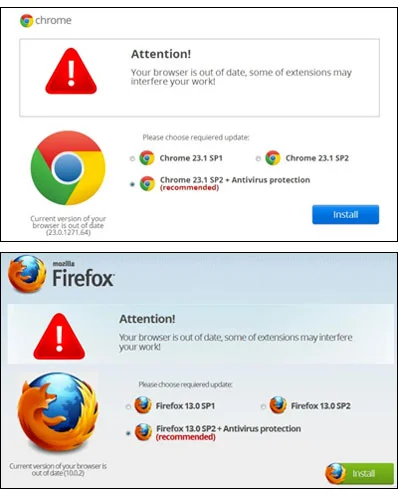
Compromised WordPress sites display fake Chrome or Edge update notifications. The “Update Browser” button triggers the ClickFix attack, claiming users need to run a command to complete the update.
GitHub Repository Compromises
Attackers compromise GitHub accounts and inject malicious README files with fake error messages. Developers visiting the repository see warnings about missing dependencies or build errors, with instructions to run a command that delivers the payload.
Fake Document Viewers
Phishing emails link to “secure document viewers” requiring ClickFix “verification.” The page claims the document is protected and needs a security check—run this command to access it.
What Gets Stolen
Once executed, infostealers extract:
- Browser passwords from Chrome, Edge, Firefox, Brave
- Session cookies and tokens (bypasses MFA)
- Cryptocurrency wallets (MetaMask, Exodus, Coinbase)
- Credit card autofill data
- Application credentials and VPN passwords
Data is exfiltrated and appears on dark web markets within hours.
Protection and Response
Individuals: Never run commands from websites. Legitimate services don’t require PowerShell execution to fix errors. If a site claims your browser needs an update, close it and update through official channels.
Businesses: Block PowerShell execution via clipboard in Group Policy. Implement application allowlisting to prevent unauthorized scripts. Monitor logs for suspicious PowerShell activity.
If compromised: Disconnect from the internet immediately. Run a full antivirus scan. Change all passwords from a clean device. Revoke active sessions in Google, Microsoft 365, and other services. Enable MFA everywhere. Monitor financial accounts for unauthorized transactions.
ClickFix works because it mimics legitimate troubleshooting. No real service will ever ask you to manually run PowerShell commands to fix an error. If you see instructions to open Run and paste something, close the page.
Related Resources

My Email Was Hacked: Phishing Response for Microsoft 365
Immediate response steps for phishing attacks that compromise Microsoft 365 and Google Workspace accounts. Covers MITM phishing that bypasses MFA, removing attacker persistence, and prevention.

AWS Lambda Backdoor Investigation: Compromised Credentials, EventBridge Persistence, and the Serverless Logging Gap
Technical analysis of an AWS cloud breach involving exposed credentials, Lambda function backdoors, EventBridge persistence mechanisms, and the unique challenges of incident response in serverless environments.
OpenClaw: Why You Should Avoid These AI Agents
OpenClaw and Moltbot AI agents promise productivity but introduce severe security risks. Learn why these tools threaten Australian SMBs and what to use instead.
Ready to Work Together?
Let's discuss how we can help protect your business and achieve your security goals.