Infostealer Malware: How Credential Theft Bypasses MFA and What to Do About It
An employee downloads what appears to be legitimate software—a cracked version of Adobe Photoshop, a free VPN app, or a gaming mod. Within seconds, infostealer malware activates, silently extracting every saved password from their browser, active session cookies for Microsoft 365 and AWS, and screenshots of open applications. The malware uploads this data to the attacker’s server and disappears. Your employee doesn’t notice anything unusual. Days later, attackers use the stolen session cookies to access your company’s email, bypassing multi-factor authentication entirely.
This scenario plays out thousands of times daily across Australian businesses. Infostealer malware has become the primary method for initial access in business email compromise (BEC), ransomware, and cloud account takeovers. Unlike traditional malware that encrypts files or installs backdoors, infostealers are designed for stealth—extract credentials, exfiltrate data, and exit before detection.
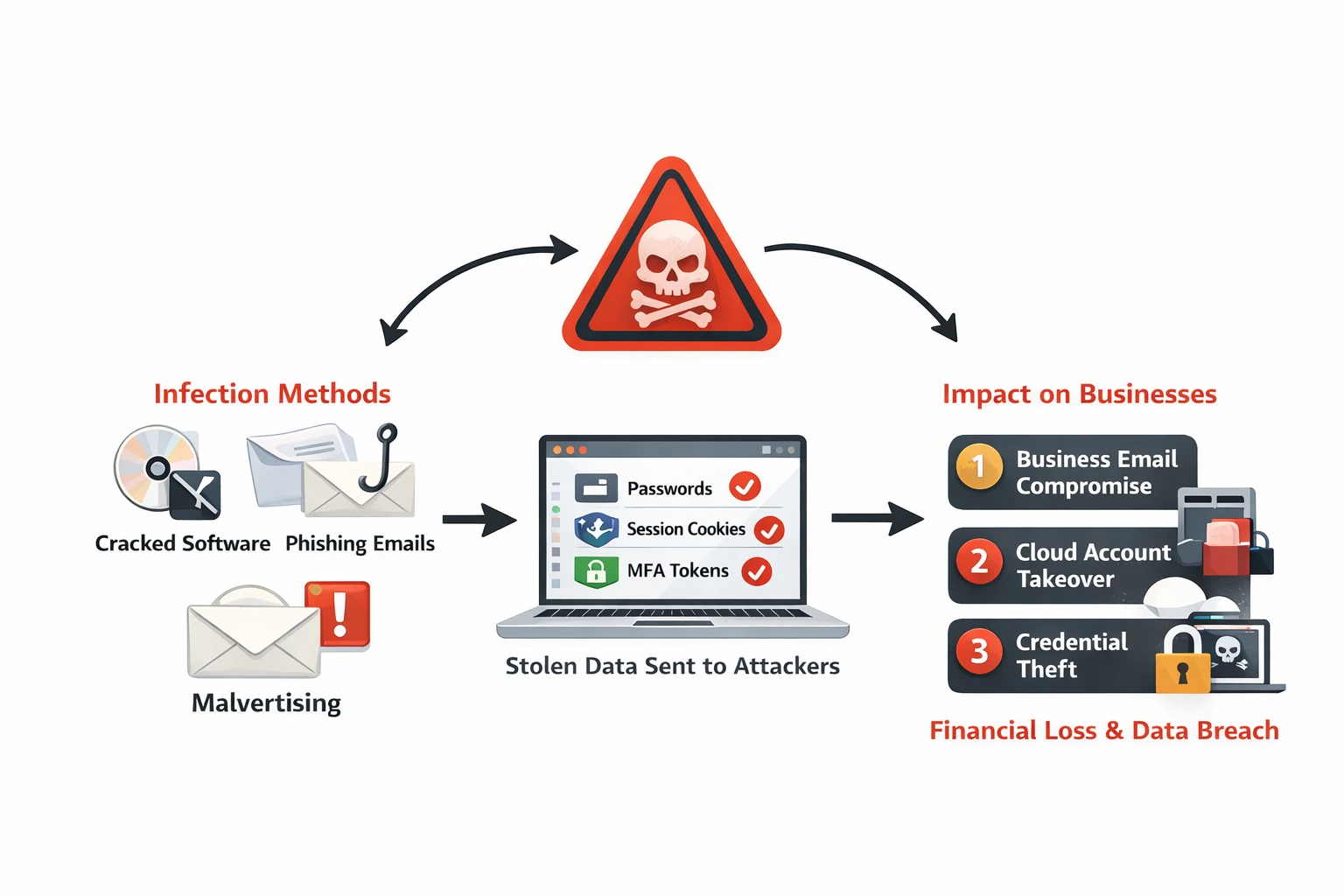
What Are Infostealers?
Infostealers are a category of malware purpose-built to harvest sensitive information from infected devices. They target:
- Browser-stored credentials: Passwords saved in Chrome, Edge, Firefox, Safari
- Session cookies and tokens: Active authentication sessions that bypass MFA
- Browser autofill data: Credit card numbers, addresses, personal information
- Cryptocurrency wallets: Private keys and wallet files
- Application credentials: Email clients, FTP tools, SSH keys, VPN configurations
- System information: Installed software, hardware specs, network details
- Screenshots and clipboard data: What the user is currently viewing or copying
Once collected, infostealers package this data and exfiltrate it to attacker-controlled servers—often as encrypted archives sent via Telegram bots or uploaded to file-sharing sites. The malware then deletes itself to avoid detection.
The Malware-as-a-Service (MaaS) Model
Most infostealers operate under a malware-as-a-service model:
- Developers sell infostealer malware subscriptions for $100-$300/month
- Buyers (often low-skill criminals) deploy the malware via phishing or fake downloads
- Stolen credentials are sold on dark web marketplaces ($5-$20 per credential set)
- Bulk credential databases sell for thousands of dollars to ransomware operators
Popular infostealer families:
- RedLine Stealer: Most widespread infostealer, distributed via cracked software and phishing
- Raccoon Stealer: Targets browser data and cryptocurrency wallets
- Vidar: Focuses on browser credentials and 2FA codes from authenticator apps
- Lumma Stealer: Newer variant with advanced anti-analysis techniques
- Mars Stealer: Derived from Raccoon, commonly distributed via malvertising
Growth trend: Infostealer detections more than doubled in Q1 2023 compared to Q4 2022. By 2024, infostealers accounted for 24% of all malware sold as a service.
How Infostealers Bypass Multi-Factor Authentication
Multi-factor authentication (MFA) protects against password theft—but infostealers bypass MFA by stealing active session tokens instead of credentials.
How Session Hijacking Works
When you log into a service like Microsoft 365, the server issues a session cookie that proves you’ve already authenticated. This cookie is stored in your browser and automatically sent with every request. Infostealers steal these session cookies along with passwords.
Attack flow:
- Employee logs into Microsoft 365, completing username, password, and MFA verification
- Browser stores session cookie proving authentication
- Infostealer malware extracts session cookies from browser’s local storage
- Attacker imports stolen session cookie into their browser
- Attacker accesses Microsoft 365 as the employee—no password or MFA required
Why this works:
- Session cookies remain valid for hours or days (Microsoft 365 sessions last 24 hours by default)
- The server sees the legitimate session cookie and grants access
- No MFA prompt occurs because the session is already authenticated
- Detection systems see logins from “trusted” session tokens
Real-world example: In November 2023, attackers used stolen cookies from RedLine Stealer infections to compromise 147 Microsoft 365 accounts across multiple Australian organisations. The attacks bypassed MFA entirely and remained undetected for 18 days.
How Employees Get Infected
Infostealers rely on social engineering to trick users into running malicious files:
1. Cracked Software and Game Mods
- Torrents for expensive software (Adobe Creative Suite, Microsoft Office, AutoCAD)
- “Free” versions of paid VPN services
- Gaming cheats, mods, and custom maps
- These downloads are bundled with infostealers disguised as installers
2. Malicious Email Attachments
- Invoice documents with embedded macros or malicious scripts
- Fake job applications with ZIP files containing infostealer executables
- “Document Viewer” installers required to open attached PDFs
3. Malvertising and SEO Poisoning
- Fake download sites ranking high in Google for popular software
- Ads for legitimate software linking to malicious downloads
- Typosquatting domains mimicking official software vendors (e.g.,
microsoftt365[.]cominstead ofmicrosoft[.]com)
4. Supply Chain Compromises
- Infostealers embedded in seemingly legitimate browser extensions
- Compromised software updates for less-regulated applications
- Open-source libraries bundled with credential-stealing code
Impact on Australian Businesses
Infostealer infections lead to cascading security incidents:
Business Email Compromise (BEC)
- Attackers access employee email accounts via stolen cookies
- Monitor email for payment workflows and vendor communications
- Send payment redirection requests from compromised accounts
- Cost: Australian businesses lost $227 million to BEC in 2023 (ACCC data)
Cloud Account Takeover
- Stolen AWS, Azure, or Google Cloud credentials enable infrastructure access
- Attackers deploy cryptominers, exfiltrate data, or pivot to ransomware
- Cloud credential theft often goes undetected due to lack of endpoint visibility
Ransomware Initial Access
- Ransomware operators purchase bulk infostealer logs from dark web marketplaces
- They search for corporate VPN credentials, admin passwords, and cloud access
- Example: The ALPHV (BlackCat) ransomware group has been linked to purchasing RedLine Stealer logs for initial access targeting
Credential Stuffing and Account Takeover
- Personal credentials stolen from employees’ home devices are tested against corporate systems
- Password reuse means home device infections compromise work accounts
Detection Strategies
Traditional antivirus detects known malware signatures, but infostealers frequently change to evade detection. Detection requires behavioral monitoring and credential exposure tracking.
1. Endpoint Detection and Response (EDR) - Deploy Avtivirus\EDR tools that detect infostealer behaviors:
2. Monitor for Compromised Credentials - Regular credential monitoring for your organisation - eviant can help
3. Analyse Authentication Logs for Anomalies - Look for session hijacking indicators in Microsoft 365, Google Workspace, or AWS CloudTrail (Impossible travel, new device no MFA prompt, new UA)
4. Monitor Network Traffic for C2 Communication - Infostealers communicate with attacker servers to exfiltrate stolen data:
- DNS queries to newly registered domains (domain age < 30 days)
- HTTPS traffic to known infostealer infrastructure (check threat intel feeds)
- Large outbound data transfers to file-sharing sites (Telegram, Mega.nz, Anonfiles)
Response Steps: What to Do When an Employee Is Infected
1. Isolate the infected device immediately:
- Disconnect from network (disable Wi-Fi, unplug Ethernet)
- Do NOT shut down the device (this may destroy forensic evidence)
- Contact your IT security team /Eviant
2. Assume credentials are compromised:
- Force password reset for the affected user across ALL systems
- Revoke all active sessions (Microsoft 365, Google Workspace, VPN)
- Invalidate session tokens and API keys
3. Review recent account activity:
- Check Microsoft 365 mailbox rules for auto-forwarding or deletion rules
- Review sent items for suspicious emails
- Check cloud service activity logs (AWS CloudTrail, Azure Activity Log)
- Look for new user accounts or permission changes
4. Scan all endpoints connected to the user:
- Run full EDR scans on user’s laptop, home desktop, mobile devices
- Check for malware persistence (scheduled tasks, startup items)
5. Monitor for follow-up attacks:
- Increase logging verbosity for the affected user’s accounts
- Watch for authentication attempts from unusual locations
- Alert SOC/security team to elevated risk
Need incident response support? Contact Eviant for infostealer infection investigations and remediation.
Australian Context: Bring Your Own Device (BYOD) Risks
Many Australian SMBs allow employees to use personal devices for work (BYOD policies). which may increases infostealer risk:
- Employees download personal software on devices that access corporate systems
- Personal browsing (torrents, game mods) introduces malware to work-connected devices
- Home devices often lack EDR or monitoring tools
Recommendations for Australian SMBs:
- Require mobile device management (MDM) for all BYOD devices
- Separate work and personal data via containerisation (Microsoft Intune, Workspace ONE)
- Prohibit BYOD access to sensitive systems (use corporate-managed devices only)
Key Takeaways
- Infostealers silently extract browser passwords, session cookies, and MFA tokens—often undetected by traditional antivirus.
- Session hijacking bypasses MFA by stealing active authentication tokens instead of passwords. Attackers use stolen cookies to access accounts without triggering MFA prompts.
- Employees get infected via cracked software, malicious ads, and phishing emails—not sophisticated exploits. Social engineering remains the primary delivery method.
- Detection requires behavioral monitoring and credential exposure tracking—not just antivirus signatures. Use EDR tools and dark web monitoring services.
- Force password resets and revoke sessions immediately when an infection is confirmed. Assume all credentials on the device are compromised.
- Prevention relies on application control, browser policies, and user education—not just endpoint protection. Essential 8 application control prevents unauthorised software execution.
Need help detecting compromised credentials or investigating infostealer infections? Contact Eviant for threat intelligence, incident response, and credential monitoring services.
Related Resources

My Email Was Hacked: Phishing Response for Microsoft 365
Immediate response steps for phishing attacks that compromise Microsoft 365 and Google Workspace accounts. Covers MITM phishing that bypasses MFA, removing attacker persistence, and prevention.

AWS Lambda Backdoor Investigation: Compromised Credentials, EventBridge Persistence, and the Serverless Logging Gap
Technical analysis of an AWS cloud breach involving exposed credentials, Lambda function backdoors, EventBridge persistence mechanisms, and the unique challenges of incident response in serverless environments.

OpenClaw: Why You Should Avoid These AI Agents
OpenClaw and Moltbot AI agents promise productivity but introduce severe security risks. Learn why these tools threaten Australian SMBs and what to use instead.
Ready to Work Together?
Let's discuss how we can help protect your business and achieve your security goals.